
Login
Downloads and 1:1 inquiry services
are available when you
log in to GAIA.
My Page
To protect your personal information,
please re-enter your password
for verification.
Sign up
By becoming a GAIA member
you can access downloads and
1:1 inquiry services
-
01
Agreement on Terms and Conditions
-
02
Enter information
-
03
Subscription completed
Sign up
By becoming a GAIA member
you can access downloads and
1:1 inquiry services
01
Agreement on Terms and Conditions
02
Enter information
03
Subscription completed
My Page
Manage your valuable information
by keeping it up to date.
()
-
Mobile
-
Email
-
Company Info
My Inquiries
| No. | Category | Title | Date | Status |
|---|---|---|---|---|
| There are no posts. | ||||
Edit Info.
Manage your valuable information
by keeping it up to date.

- Privacy Policy
- Terms of Service
- Article 1 (Purpose)
- Baron Consultant (“the Company”) has established this Privacy Policy to protect the personal information of its customers("Users") using the GAIA service (“Service”) and to fulfill its responsibilities and obligations under the Personal Information Protection Act. This policy explains how the personal information provided by users is collected, used, stored, and protected.
- Article 2 (Purpose of Personal Information Processing)
- The company processes personal information for the following purposes.
The personal information processed is not used for purposes other than those listed below,
and if the purpose changes, the company will take necessary measures such as obtaining separate consent
under Article 18 of the Personal Information Protection Act.
- Identity verification: For membership registration, management, and contact via phone or email
- Service provision: Handling tasks for notifications and service delivery
- Product brochure downloads: Delivering explanatory materials
- Consultation and demo requests: Providing consultations, demos, and collecting contract-related information
- Event participation: Providing guidance and seminars/explanations/education
- Security guide provision: Delivering informational materials
- Technical support inquiries: Supporting service use
- Service improvement feedback: Improving service quality
- Marketing: Sending newsletters and magazines to the same customer
- The company processes personal information for the following purposes.
The personal information processed is not used for purposes other than those listed below,
and if the purpose changes, the company will take necessary measures such as obtaining separate consent
under Article 18 of the Personal Information Protection Act.
- Article 3 (Retention and Processing Period of Personal Information)
- The company processes and retains personal information within the period stipulated by law or within the period consented to by the data subject at the time of collection.
- Processing and retention periods are as follows:
- Member information: From the date of registration until one year after withdrawal
- Personal information for marketing, consultation, and contract purposes: 2 years
- Article 4 (Provision of Personal Information to Third Parties)
- The company processes personal information only within the scope set forth in Article 2 and provides it to third parties only with the consent of the data subject or when permitted by law under Articles 17 and 18 of the Personal Information Protection Act.
- The company provides personal information to third parties as follows:
- Recipients: Investigative agencies, related institutions, and the reported organization
- Purpose: Handling personal information infringement complaints
- Provided information: Name, contact information, email
- Retention and use period: Retained for the legally required period and destroyed upon achieving the purpose
- Article 5 (Entrusted Processing of Personal Information)
- The company does not outsource personal information processing to external organizations and handles it internally.
- If the company outsources specific tasks (e.g., recruitment), it will announce it on the company website before implementation and obtain consent from the data subject.
- Article 6 (Rights and Obligations of Data Subjects and Methods of Exercise)
- Data subjects may exercise rights such as requesting access, correction, deletion, or suspension of processing of their personal information at any time.
- These rights may be exercised through the following methods:
- In writing: Submitting documents to the company address
- Email: Request via company email
- Fax: Request via company fax number
- These rights may also be exercised through a legal representative or an authorized agent. In such cases, a power of attorney must be submitted in accordance with Annex No. 11 of the “Notice on Personal Information Processing Methods.
- Requests for access or suspension of processing may be restricted under Articles 35(4) and 37(2) of the Personal Information Protection Act.
- Requests for correction or deletion may be restricted if the information was collected pursuant to other laws.
- The company verifies whether the requester is the data subject or a legitimate representative.
- Article 7 (Items of Personal Information Processed)
- The company processes the following personal information items:
- Items collected
- Required items: Name, mobile phone number, email
- Optional items: Company phone number, inquiry details
- Collection methods: Through the website, phone, and email
- Article 8 (Destruction of Personal Information)
- The company promptly destroys personal information once the retention period expires or the processing purpose has been achieved.
- Even after the agreed retention period expires or the purpose is fulfilled, if preservation is required under law, the information will be stored in a separate database or different storage location.
- Destruction procedures and methods:
- Procedure: Select personal information to be destroyed and obtain approval from the personal information protection officer.
- Method: Delete electronic files irreversibly; shred or incinerate paper documents.
- Article 9 (Measures to Ensure Security of Personal Information)
- The company takes the following measures to ensure the security of personal information:
- Administrative measures: Establishing and implementing internal management plans, regular employee training
- Technical measures: Managing access rights to personal information systems, installing access control systems, encryption, installing security programs
- Physical measures: Restricting access to computer rooms and data storage rooms
- The company takes the following measures to ensure the security of personal information:
- Article 10 (Matters Related to Installation, Operation, and Refusal of Automatic Personal Information Collection Devices)
- The company does not use cookies. Cookies are small files that store and retrieve user information, and the GAIA service does not use cookies.
- Article 11 (Personal Information Protection Officer)
- The company is in charge of handling personal information and designates a personal information protection officer to handle complaints and remedy damages by data subjects related to personal information processing.
- Privacy Officer:
- Name: Park Jin
- Position: Lead researcher
- Contact: +82-2-2141-7485
- Fax: +82-2-2141-7599
- Email: jpark@baroncs.co.kr
- Article 12 (Request for Access to Personal Information)
- The data subject may request the following department to view personal information under Article 35 of the Personal Information Protection Act. The company will endeavor to expedite the request for personal information access by the data subject. Department for receiving and processing personal.
- information access requests:
- Department name: General Planning Office
- Manager: Kwon Hyukjin
- Contact: +82-2-2141-7465
- Fax: +82-2-2141-7599
- e-mail: baroncs@baroncs.co.kr
- Article 13 (How to remedy infringement of rights)
- The data subject may apply for dispute resolution or consultation with the Personal Information Dispute Mediation Committee, the Korea Internet & Security Agency's Personal Information Infringement Reporting Center, etc. for relief due to personal information infringement.
- Personal Information Dispute Mediation Committee: 1833-6972 (without country code) (www.kopico.go.kr )
- Personal Information Infringement Reporting Center: (without country code) 118 (privacy.kisa.or.kr )
- Supreme Prosecutors' Office: (without country code) 1301 (www.spo.go.kr )
- National Police Agency: 182 (without country code) (www.police.go.kr )
- The data subject may apply for dispute resolution or consultation with the Personal Information Dispute Mediation Committee, the Korea Internet & Security Agency's Personal Information Infringement Reporting Center, etc. for relief due to personal information infringement.
- Article 14 (Change in Personal Information Processing Policy)
- This Personal Information Processing Policy shall be notified in advance on its website at least seven days prior to its revision if the contents are added, deleted or modified in accordance with changes in laws, policies or security technologies.
- Addenda
- Article 1 (Effective Date)
- This privacy policy will take effect on October 1, 2024.
- Article 1 (Effective Date)
- Article 2 (Obligation to amend and notify)
- If the company changes its personal information processing policy, it will notify the change through the notice page in the service seven days before the effective date. However, if there is a significant change in the rights or obligations of the user, it will be notified 30 days before the effective date.
- If some of the provisions of this Privacy Policy are invalidated or unenforceable due to legal or other reasons, the remaining provisions shall remain in force. The invalidated provisions shall be amended in such a manner as conforming to relevant laws and regulations to remain in effect.
In the event of a change in the personal information processing policy, the company will notify the user in the following ways:
- Service Initial Screen or Pop-up Announcement
- Send an e-mail
- Announcement on the company's website
- The company also protects the personal information of non-members at the same level as members. If non-members refuse to provide personal information, there may be restrictions on the use of some services.
- The company does not collect the personal information of children under the age of 14. If the personal information of a child under the age of 14 is collected, it must be agreed upon by the legal representative, and if it is collected without the consent of the legal representative, it is destroyed without delay.
- The company does not transfer the user's personal information abroad, and if necessary in the future, the user's consent is obtained in advance.
- Matters not specified in this policy are subject to the company's internal policy and relevant laws and regulations.
- Chapter 1. General Rules
- Article 1 (Purpose)
- These Terms and Conditions are intended to establish rights, obligations and responsibilities between the Company and the User and other necessary matters in using GAIA software provided by Baron Consultants (hereinafter referred to as the "Company")
- Article 2 (Definition of Terms)
The terms used in these Terms and Conditions are defined as follows:- "Service" means any software and related services provided by the Company.
- The term "user" means a member or non-member who accesses the company's services and uses the services provided by the company pursuant to these terms and conditions.
- "Member" means a person who has agreed to these Terms and Conditions and entered into a use agreement with the Company.
- "Non-member" means a person who uses some of the services provided by the company without signing up for membership
- Article 3 (Effects and Changes of Terms and Conditions)
- These Terms and Conditions become effective when the User agrees to them and the Company confirms its acceptance.
- The Company may change these Terms and Conditions if necessary, and the changed Terms and Conditions will take effect after they are announced on the Service Screen.
- Article 4 (External Rules)
- Matters not specified in these Terms and Conditions shall be subject to relevant laws and regulations of the Republic of Korea.
- Article 1 (Purpose)
- Chapter 2. Service Use Contracts
- Article 5 (Establishment of a contract for use)
- The contract of use is established when the user agrees to the terms and conditions, completes the subscription by completing the subscription by filling out a prescribed membership application provided by the company, and the company approves it.
- Article 6 (Reservation and Refusal of Use Contracts)
The Company may suspend or reject the establishment of the use contract in any of the following cases:- If the contents of the application are found to be false
- When it is technically impossible to provide the service
- Article 7 (Change of contract matter)
- Members can view and modify their information at any time through the Personal Information Management menu. If members' information changes, it must be corrected immediately, and they are responsible for any problems that arise from not modifying it.
- Article 5 (Establishment of a contract for use)
- Chapter 3. Personal Information Protection
- Article 8 (Principle of Privacy)
- Members' personal information is protected under relevant laws and regulations.
- The company manages the details related to privacy in accordance with a separate privacy policy, which allows users to find out more about privacy management at any time.
- Article 9 (compliance with personal information processing policy)
- The company manages specific matters related to personal information protection in accordance with the personal information processing policy.
- Matters concerning the collection, use, provision, storage, and protection of personal information follow the company's personal information processing policy, and users can check it on the company's website.
- The company does its best to protect your personal information and securely manages your personal information in accordance with relevant laws and regulations.
- Article 10 (Protection of Personal Information of Children Under 14)
- If the Company collects personal information from children under the age of 14, the consent of a legal guardian is required.
- Guardians may request access, correction, or deletion of the child’s information, and the Company will process such requests promptly.
- Specific details are provided in the Privacy Policy.
- Article 8 (Principle of Privacy)
- Chapter 4. Provision and Use of Services
- Article 11 (Providing Services)
- The company will start the service upon approval of its members' application for use. In principle, the use of the service is 24 hours a day, 7 days a week.
- Article 12 (Change and Interruption of Services)
- The company may change or suspend the service after prior notice if it is difficult to provide the service.
- Article 11 (Providing Services)
- Chapter 5. Providing Information and Advertising
- Article 13 (Information provision and advertising)
- The company may provide information and advertisements deemed necessary while using the service.
- Members may refuse to receive unwanted information.
- Article 13 (Information provision and advertising)
- Chapter 6. Managing Posts
- Article 14 (Management of Posts)
- The company may delete the contents posted by its members if they are illegal or in violation of its terms and conditions.
- The copyright of my 15 trillion won)
- The copyright of publishing is to members, and the company can be used for service promotion and improve it.
- Article 14 (Management of Posts)
- Chapter 7. Termination of Contracts and Restrictions on Use
- Article 16 (Cancellation of Contract)
- Members may request termination of the contract at any time, and the company handles it quickly.
- Article 17 (Use Restrictions)
- The company may restrict service use if a member violates the terms and conditions.
- Article 16 (Cancellation of Contract)
- Chapter 8. Liability and Disclaimer
- Article 18 (Compensation for Damages)
- The company is not liable for any damages incurred by members in connection with services provided free of charge.
- Article 19 (Disclaimer)
- The company is not responsible for failure to provide services due to force majeure such as natural disasters.
- Article 18 (Compensation for Damages)
- Chapter 9. Paid Services
- Article 20 (Use of Paid Services)
- The company may provide certain services to members for a fee.
- Details regarding paid service fees, payment methods, and refund procedures will be provided individually via phone or email at the time of quotation.
- Service fees must be paid using the payment methods specified by the company.
- Paid service fees are based on prepayment, and refunds for any remaining service period in the event of suspension or cancellation will be handled according to the company's refund policy.
- The company will try to address issues related to members' use of paid services. However, except in cases of intentional misconduct or gross negligence, the company is not liable for any damages arising from the use of paid services.
- Article 21 (Refund Policy)
- If the member has not started using the service within 7 days of payment, a full refund may be issued.
- If service interruption occurs due to unavoidable reasons, the company will process a refund for the unused portion.
- If service use is suspended due to reasons attributable to the member, a refund cannot be issued.
- Refunds will be processed to the account designated by the member and completed within 7 days after the request.
- Article 22 (Suspension and Termination of Paid Services)
- To terminate a paid service, the member must submit a termination request to the company's customer support center.
- If a member violates the terms or uses paid services fraudulently, the company may immediately suspend service use and terminate the contract.
- Article 20 (Use of Paid Services)
- Chapter 10. Prohibition of Transfer
- Article 23 (Prohibition of Transfer)
- Members may not transfer or assign their service usage rights or contractual status to third parties, nor may they offer them as collateral.
- Article 23 (Prohibition of Transfer)
- Chapter 11. Jurisdiction Court
- Article 24 (Dispute Resolution)
- In the event of a dispute related to the use of the service, the company and the member shall make sincere efforts to resolve it through consultation.
- Article 25 (Jurisdiction)
- Any dispute arising under these terms shall be subject to the jurisdiction of the Seoul Central District Court.
- Article 24 (Dispute Resolution)
- supplementary
- These terms and conditions shall take effect from October 1, 2024.
Find ID/
Change
Password
- Find ID
- Change Password
| Name |
|
|---|---|
| Mobile |
|
Value of GAIA
and construction and generates real-time borehole logs through a web-based system
instructions
transmission
download
-
Creating
Borehole Plans
(location check
via web map)Entering task details, borehole locations, road alignment data, worker info (equipment, email, contacts) -
Performing
Borehole
Investigations
(task instructions &
site status)Sending URLs and security codes to field personnel via email/SMS -
Borehole LogAutomatically generates preliminary logs on download, updates with lab results, adds rock joint info, and produces complete borehole logs
-
DeliverablesAutomatically generates field logs, borehole logs, borehole profiles, and investigation location maps
(Driller & Field Supervisor)
-
Input Stratigraphic
Layer Information
per Borehole (Web-based)Creating borehole logs
ㆍLocation & groundwater level
ㆍSPT results and stratigraphic layer information
ㆍSite photos and sample-box images
and deliverables improves reliability, convenience, accuracy, and efficiency of field-data workflows
Real-time collaboration and visualized UX
for efficient field-data management,
with instant mobile data sharing
Information Management
We ensure the security and reliability of on-site information by designating real workers for each borehole and storing and managing stratigraphic data by creating web records, and share the on-site situation in real time through monitoring of on-site work conditions to support collaboration between (site) workers and (headquarters) managers.
Design
Visualizes layer symbols, colors, sample types, moisture conditions, etc. Supports easy data entry with a WYSIWYG design
Support
Using smartphones and tablets, users can process borehole data, geological layer information, groundwater levels, site conditions, and sample-box information in real time and share various field information instantly.
GAIA is structured according to the stages of borehole investigation,
including planning, investigation, borehole logging, and deliverable generation.
After zooming in on the screen Displays descriptions for each section in the order of the top menu
-
GAIA is structured according to the stages of borehole investigation, including planning, investigation, borehole logging, and deliverable generation.
-
Planning of the Examination Survey
File menu Check the File menu, such as Open/Save, and the files you have used recently Top menu Information input and verification by drilling survey process Settings and Help Columnar Form and borehole legend settings, General Note Project Information Enter basic information such as business name, place of order, etc. and check drilling survey quantity -
Planning of the Examination Survey
Detailed plan Enter detailed drilling survey plan, number, drilling location, coordinates, etc Worker Registration and designation of drillers and field agents Current Status Check the drilling survey plan on the map -
Perform a drilling investigation
Assigned Personnel Identification of drillers and on-site representatives for each borehole designated in the drilling survey plan Field status Real-time inspection of work order by borehole (mobile device connection for web recording) and boring start time/end time Field strata information Download stratum information and check job processing status in real time, such as photos and records Refresh Update Job Processing Status -
The abstract view of the drilling.
Classification Column map classification according to number prefix Header Information Input and modify header information for each column chart text Check the web records by columnar map, check the contents of the columnar map, such as symbols and colors column-view editing Edit the main text by columnar map (strata symbol, color tone, sample form, etc.) -
Achievements
List of deliverables Select a list of export and preview achievements such as field drilling survey records, drilling main charts, etc Preview Preview area for confirmation of selected deliverables prior to export
-
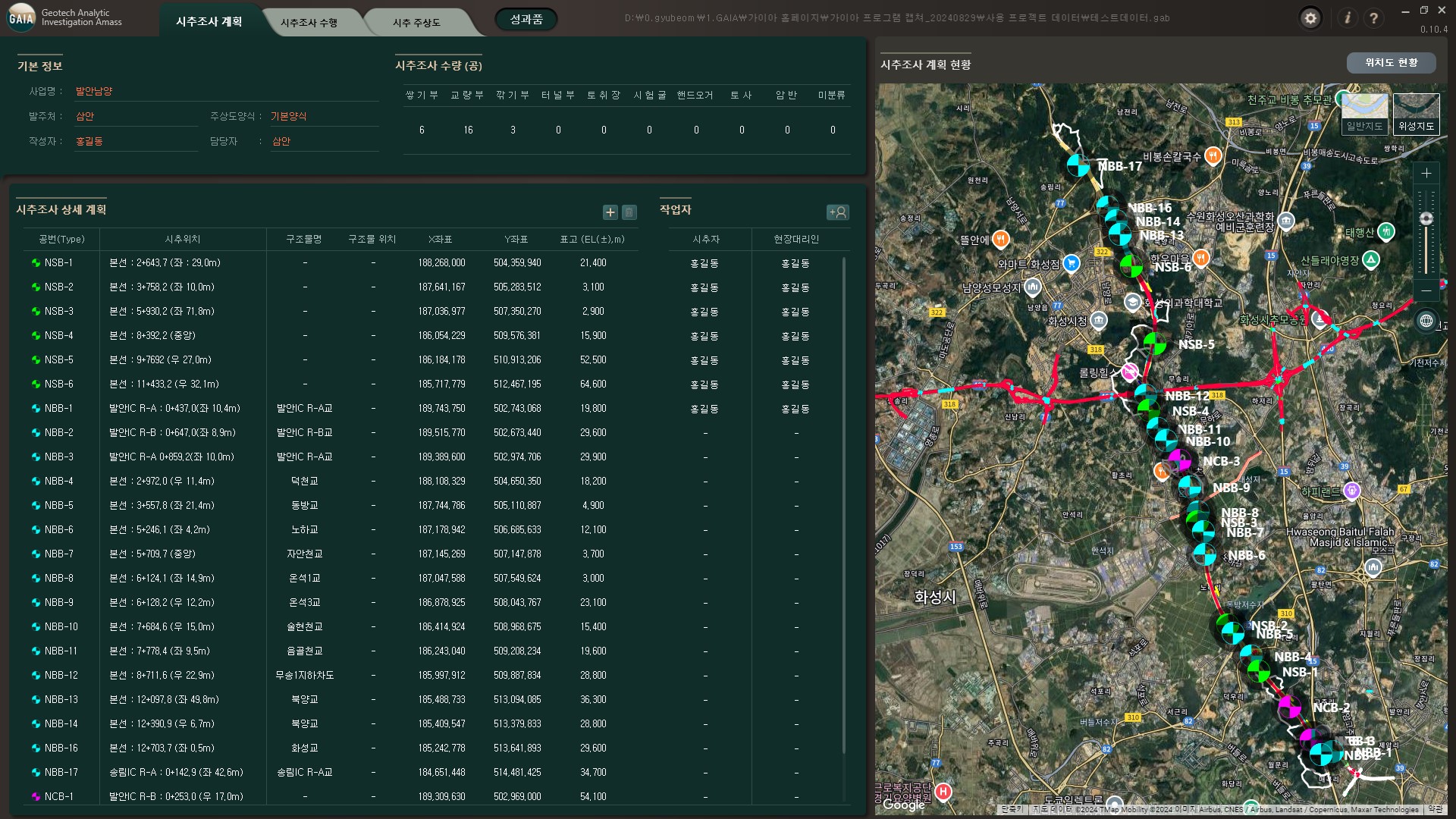
-
File menu
Top menu
Settings and Help
Project Information
-
Current Status
Detailed plan
Worker
-
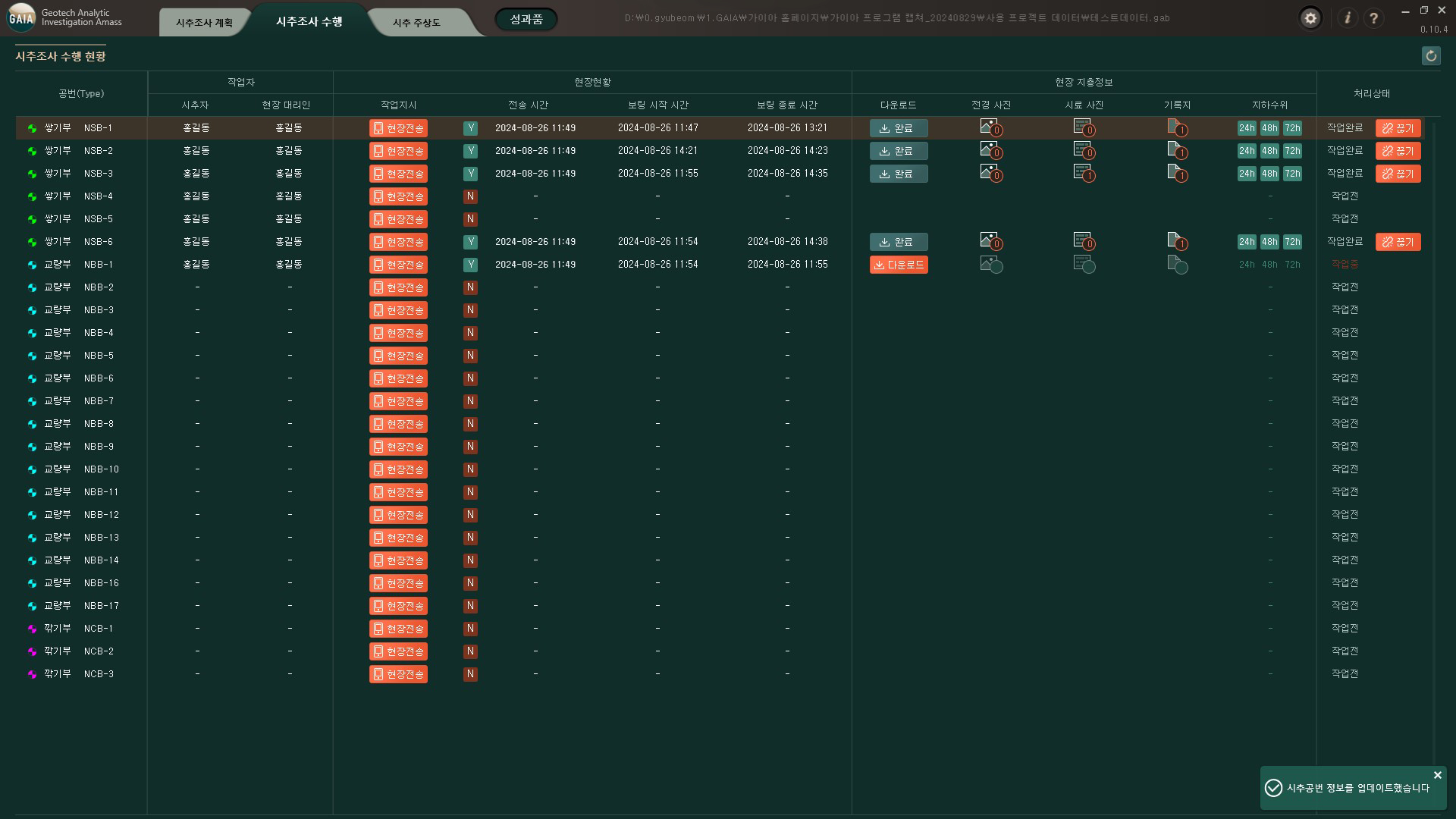 Refresh
Assigned
Refresh
Assigned
Personnel Field
status Field
strata information -
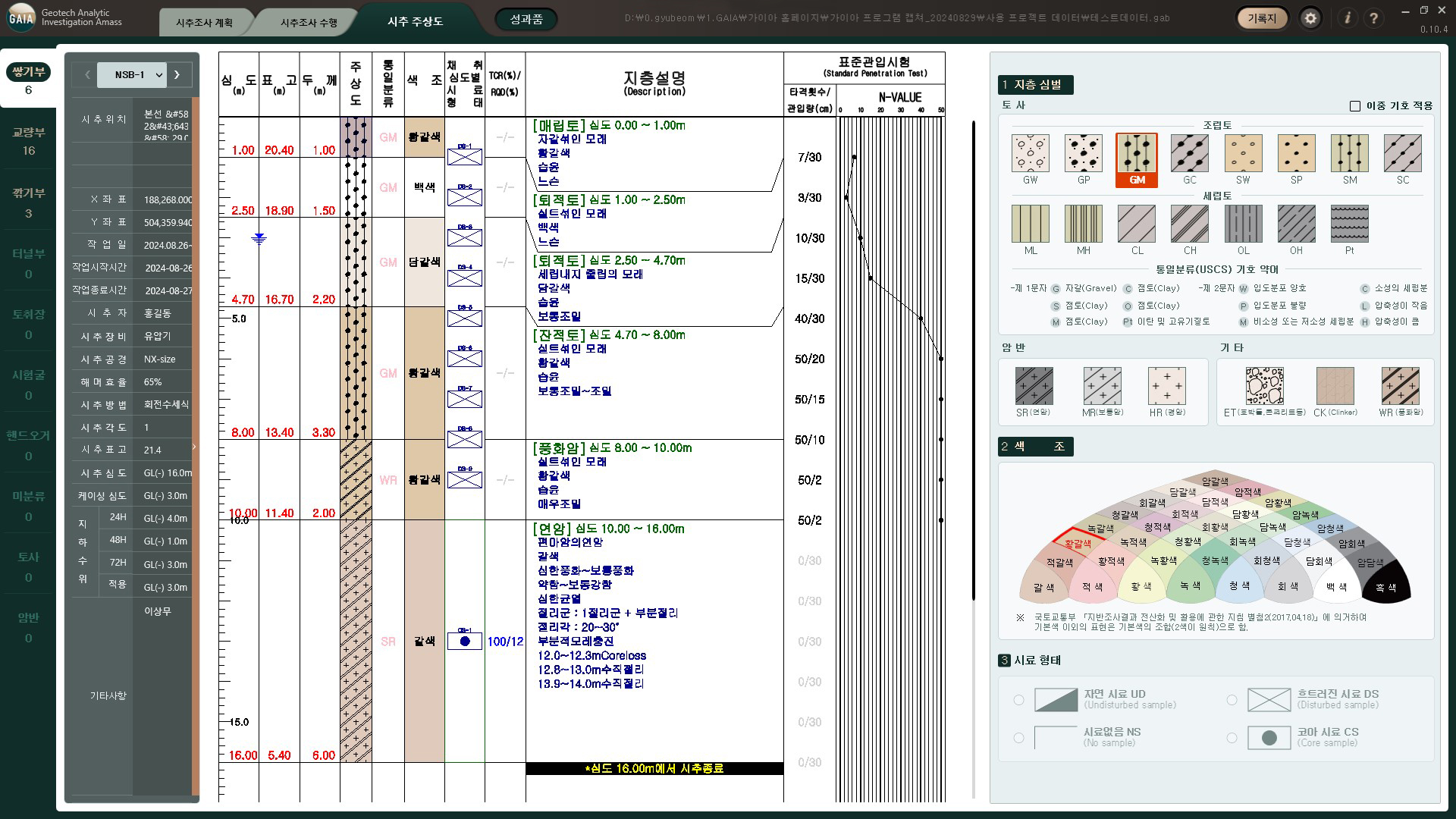 Classification
Header Information
column-view editing
text
Classification
Header Information
column-view editing
text
-
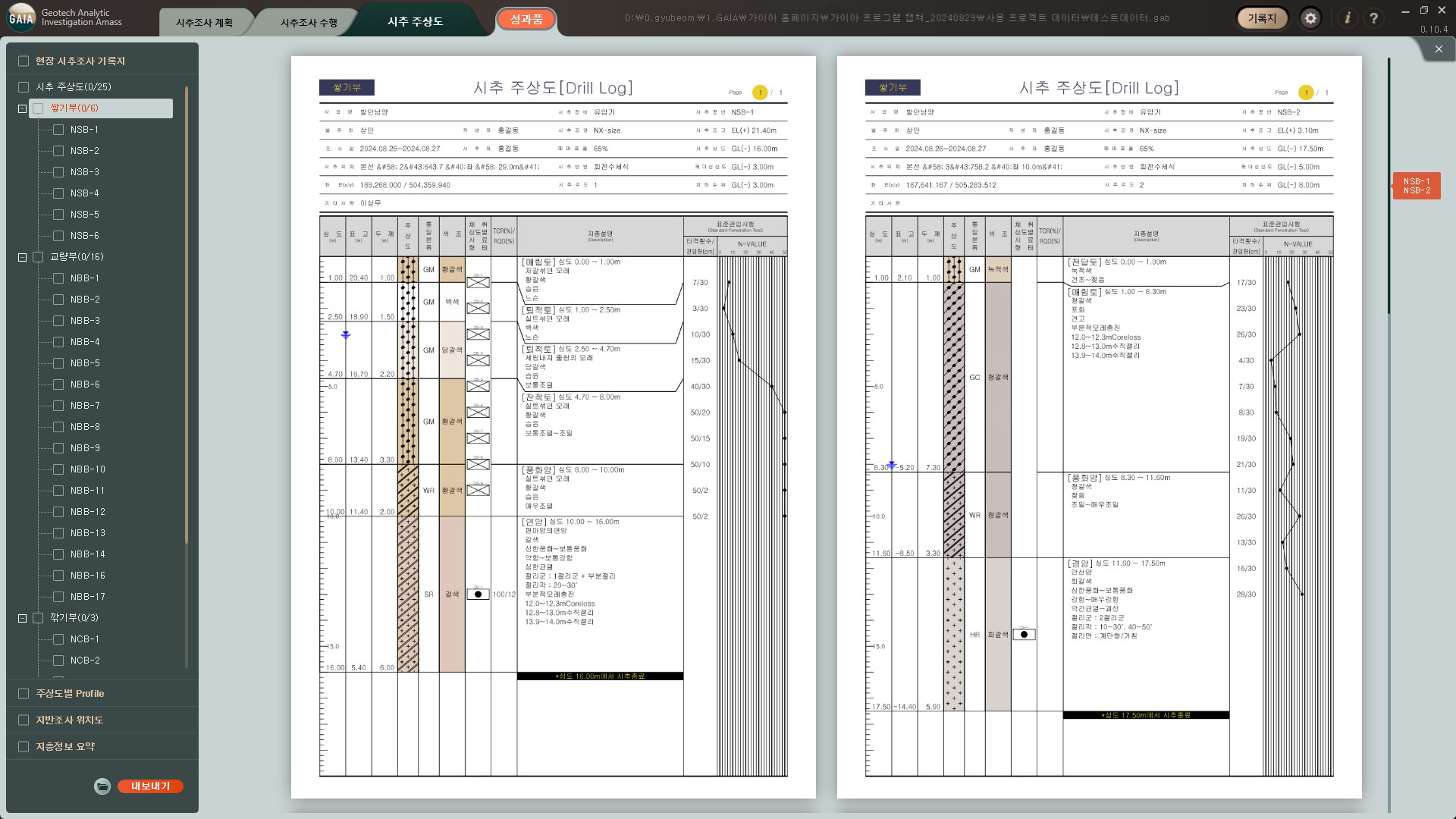 List of deliverables
Preview
List of deliverables
Preview